
EA ModelMate
Introduction
EA ModelMate is a modular extension for Sparx Systems Enterprise Architect. Its tried-and-tested assistants complement the existing features of Enterprise Architect, simplify recurring tasks and help users create and maintain consistent, traceable, high-quality models.
Whether you model independently or work with a larger team in shared repositories, EA ModelMate provides suitable tools for everyday modelling. Two editions are available: EA ModelMate and EA ModelMate Enterprise.

Current version: 3.5.0
Security Update for Enterprise Architect 17.2.1721
Extensive security updates have been implemented in Enterprise Architect 17.2. From build 1721 onwards, certain direct database access operations are no longer possible. In particular, the undocumented Repository.Execute() function has been disabled and SQL access to security tables has been restricted.
Some functions of EA ModelMate Enterprise are also affected. The following functions are currently unavailable in EA 17.2.1721:
- Part & Port Synchronisation
- Generation of Model Validation Assemblies from C# code in Enterprise Architect
As far as we are aware, all other functions of EA ModelMate and EA ModelMate Enterprise can still be used.
We recommend that customers check, before updating to EA 17.2.1721, whether any add-ins, scripts or integrations they are using are affected by these changes. If you use any of the EA ModelMate Enterprise functions mentioned above or employ custom extensions, please contact our technical support team before updating.
Two editions – tailored to your requirements
EA ModelMate supports individual users with typical modelling tasks: finding existing elements, checking dependencies, preventing unintended changes and arranging diagrams with ease.
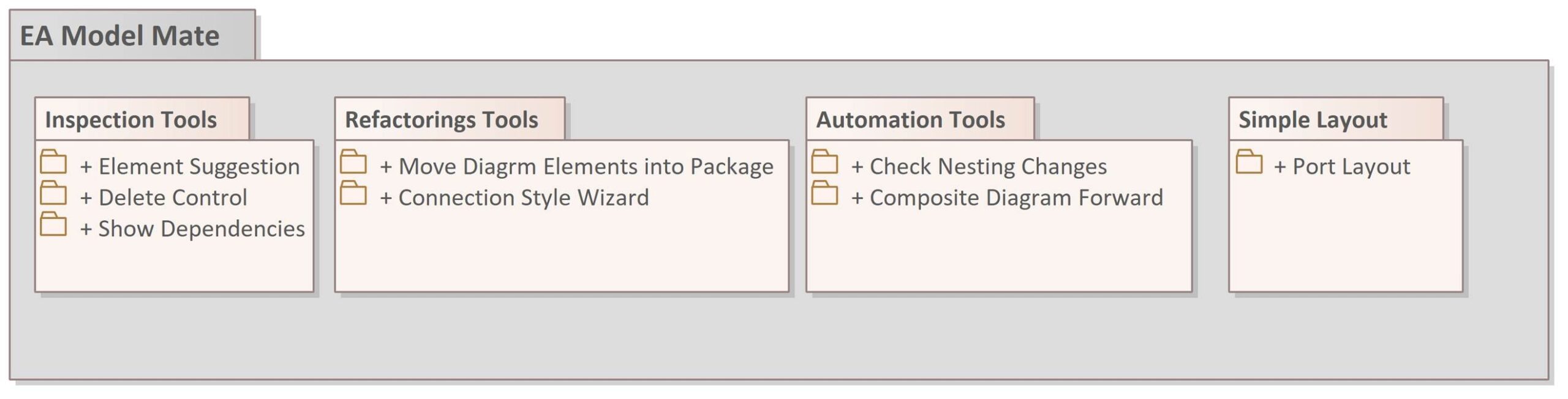
EA ModelMate Enterprise builds on this foundation and extends the range of features, particularly for teams, larger modelling environments and enterprise-wide standards. Additional tools support model maintenance, automation, reuse, model validation and governance. The aim is to apply modelling guidelines consistently and simplify administration and cross-team collaboration.
EA ModelMate Enterprise includes all EA ModelMate features.

Licensing model at a glance
When you purchase an Enterprise Architect licence or renew an EA licence through SparxSystems Europe, you receive an EA ModelMate licence for each EA licence purchased or renewed, with no additional licence fee, for twelve months. When you subsequently renew your EA licence through SparxSystems Europe, you also receive the corresponding EA ModelMate licence for a further twelve months.
EA ModelMate Enterprise is the paid extension for customers with a valid EA licence purchased through SparxSystems Europe. The Enterprise licence is also valid for twelve months.
| Aspect | EA ModelMate | EA ModelMate Enterprise |
|---|---|---|
| Functionality | Core assistants for productive modelling | All ModelMate features plus Enterprise, team and governance tools |
| Licence fee | No additional charge when purchasing or renewing an EA licence through SparxSystems Europe | €98,- per Named licence / €198,- per Floating licence for 12 months |
| Licence term | 12 months | 12 months |
| Prerequisite | Related EA purchase or EA renewal through SparxSystems Europe | Valid EA licence purchased through SparxSystems Europe |
| Licence type | Named or Floating, matching the EA licence | Named or Floating, matching the EA licence |
Example: When purchasing five EA Named licences through SparxSystems Europe, you receive five EA ModelMate Named licences for twelve months at no additional cost. You can upgrade these to the Enterprise edition by purchasing five EA ModelMate Enterprise Named licences. The same principle applies to Floating licences.
After the respective twelve-month licence term expires, the licensed assistants are no longer available. Continued use requires the relevant renewal in accordance with the conditions outlined above.
EA ModelMate Enterprise
Cost per named-user licence: €98 per year
Cost per floating licence: €198 per year
All prices are quoted in Euro and exclude VAT.
Feature comparison
The following overview shows which tools are included in each edition. EA ModelMate Enterprise also includes all basic features.
| Function | EA ModelMate | EA ModelMate Enterprise |
|---|---|---|
| Element Suggestion | ● | ● |
| Delete Control | ● | ● |
| Show Dependencies | ● | ● |
| Move Elements into Package | ● | ● |
| Connector Style Wizard | ● | ● |
| Check Nesting | ● | ● |
| Composite Diagram Forward | ● | ● |
| Port Layout | ● | ● |
| Metamodel Generator | — | ● |
| Package Dependency Generator | — | ● |
| Find and Replace | — | ● |
| Multi Element Editor | — | ● |
| Template Package Synchronisation | — | ● |
| Auditing | — | ● |
| Auto Nesting | — | ● |
| Automatic Connector Style Assistant | — | ● |
| Part & Port Synchronisation | — | ● |
| Extra Built-in Validation Rules | — | ● |
| Generate Validation Rules from Model Constraints | — | ● |
EA ModelMate – Assistants for Everyday Modelling
Element Suggestion
Suggests suitable existing model elements when new elements are created. This makes them easier to reuse, reduces duplicates and improves consistency within the repository.
Delete Control
Analyses how a model element is used and the potential impact of its removal before it is deleted, including relationships, type references and occurrences in diagrams. The Recycle Bin feature supports the controlled removal and restoration of model content.
Show Dependencies
Shows where and how an element is used in the model. This helps identify dependencies and assess the impact of planned changes more effectively.
Move Elements into Package
Conveniently moves model elements selected in a diagram to another Package. This makes it easier to reorganise models without lengthy navigation through the Project Browser.
Connector Style Wizard
Allows targeted customisation of Connector appearance, such as line routing, colour or line weight, including for multiple connections. Filters make it easier to select the affected Connectors.
Check Nesting
Warns users when nesting is changed or model elements are moved in the Project Browser, and requests confirmation. This helps prevent unintended changes to the model structure.
Composite Diagram Forward
Makes it easier to navigate to Composite Diagrams of referenced Classifiers. Double-clicking a typed element can take the user directly to the corresponding detailed diagram.
Port Layout
Supports consistent positioning of Ports and Port labels in diagrams, reduces manual layout work and improves the readability of interface representations.
EA ModelMate Enterprise – For Teams, Standards and Governance
EA ModelMate Enterprise is designed for organisations that want to establish reliable modelling practices beyond individual users. The additional assistants facilitate collaboration, standardise recurring processes and support the enforcement of modelling rules. Centrally managed and globally configurable settings, together with administration functions, are part of the Enterprise offering; their exact scope depends on the release.
Metamodel Generator
Analyses the element types, stereotypes, properties and relationships used in the repository and generates a representation of the metamodel in use. This provides transparency and a basis for shared modelling guidelines.
Package Dependency Generator
Identifies dependencies across Packages based on model references and displays them at Package level. This makes structural relationships and the impact of changes easier to understand.
Find and Replace
Searches for and replaces content in selected model fields, such as the names of elements, diagrams, roles or Connectors, as well as behavioural and code text. Supports consistent maintenance of large repositories.
Multi Element Editor
Edits the properties of multiple selected model elements in a single operation. This reduces repetitive changes and makes it easier to update model content consistently.
Template Package Synchronisation
Synchronises the Tagged Values of model elements with their corresponding templates in Template Packages. Updated templates can therefore be applied to the relevant elements in a controlled manner.
Auditing
Augments the information about the most recent change to a model element by identifying the user who made it. This improves traceability in shared models without necessarily having to enable Enterprise Architect’s built-in auditing.
Auto Nesting
Assigns newly created elements to the intended Packages according to predefined rules. This helps maintain a defined repository structure and avoids the need for manual follow-up work.
Automatic Connector Style Assistant
Automatically applies predefined presentation rules when new Connectors are created. This produces diagrams with a consistent appearance that conforms to the modelling methodology.
Part & Port Synchronisation
Supports the automatic creation and synchronisation of related Properties, Parts, Ports and selected Connectors. This makes it easier to maintain consistent structures, particularly in systems modelling methodologies.
Extra Built-in Validation Rules
Extends model validation in Enterprise Architect with additional predefined validation rules. Automated checks help identify modelling errors and deviations from specified requirements at an early stage.
Generate Validation Rules from Model Constraints
Supports the derivation of validation rules from Constraints defined in the model. This allows modelling requirements expressed in domain-specific terms to be converted more systematically into verifiable rules.
Targeted AI assistance instead of uncontrolled automation
AI can provide valuable support to modellers with selected tasks – for example, understanding content, finding similar model elements or analysing model information. Optional AI-powered features are planned for EA ModelMate Enterprise in the future, designed to integrate this support into existing modelling workflows in a targeted manner.
The modeller remains at the centre of this approach: AI should provide suggestions, offer guidance and help prepare decisions, rather than take over responsibility for the specialist judgement involved. The use of AI is optional; the specific capabilities and technical prerequisites depend on the features and release in question.
EA ModelMate and Kernaro AI complement each other: EA ModelMate focuses on practical assistants and methodologically integrated workflows directly within Enterprise Architect. Kernaro AI addresses more advanced AI-based interactions with models. Both approaches support a more productive, controlled model-based way of working without needing to provide the same capabilities.
Installation, use and getting started
EA ModelMate is provided as an extension for Enterprise Architect. It is currently installed using an MSI installation package. Once installation and licence activation are complete, the assistants enabled for your edition are available in Enterprise Architect.
An EA ModelMate Example Model containing examples of the assistants is available to help you get started. Additional information, learning resources and training opportunities can support onboarding and practical application.
The extension is intended for both the 32-bit and 64-bit editions of Enterprise Architect. Please refer to the published version and compatibility information for your specific EA version.
FAQs
What is the difference between EA ModelMate and EA ModelMate Enterprise?
EA ModelMate provides practical assistants for everyday modelling. EA ModelMate Enterprise includes all EA ModelMate features, as well as additional tools for larger models, teamwork, standardised processes and model governance.
How do I obtain EA ModelMate?
When you purchase or renew an EA licence through SparxSystems Europe, you receive one EA ModelMate licence per EA licence purchased or renewed, with no additional licence fee, for twelve months.
Can I purchase EA ModelMate separately?
EA ModelMate is currently linked to the purchase or renewal of an Enterprise Architect licence through SparxSystems Europe and is not intended to be sold as a regular standalone product.
How much does ModelMate Enterprise cost?
An EA ModelMate Enterprise licence costs €98,- for a Named licence or €198,- for a Floating licence, each for twelve months. A valid EA licence purchased through SparxSystems Europe is required.
Are Named and Floating licences available?
Yes. The EA ModelMate licence type corresponds to the relevant EA licence: EA Named is combined with EA ModelMate Named, and EA Floating with EA ModelMate Floating.
How many ModelMate licences will I receive?
You receive a matching EA ModelMate licence for each EA licence purchased or renewed through SparxSystems Europe. For example, five EA Floating licences correspond to five EA ModelMate Floating licences.
How long is the licence valid?
Both EA ModelMate and EA ModelMate Enterprise are licensed for twelve months at a time. The licence term is not unlimited.
What happens when my EA ModelMate licence expires?
Once the licence expires, the licensed assistants are no longer available. When you purchase a further EA renewal through SparxSystems Europe, the corresponding EA ModelMate licence can be renewed for twelve months.
How do I renew EA ModelMate Enterprise?
Continued use requires a new paid Enterprise licence. A valid EA licence obtained through SparxSystems Europe remains a prerequisite.
Do I have to use AI?
No. AI-powered features are planned as an optional addition. EA ModelMate remains focused on specific, transparent assistance functions for modelling tasks.
Does EA ModelMate replace Kernaro AI?
No. EA ModelMate and Kernaro AI take complementary approaches: integrated modelling assistants on the one hand, and more advanced AI-based model interaction on the other.
How is ModelMate installed?
EA ModelMate is currently provided as an MSI installation package. Installation guidance and details of supported EA versions can be found in the relevant product information.
Contact
Would you like to use Enterprise Architect more productively with EA ModelMate or support your team with EA ModelMate Enterprise? Contact SparxSystems Europe. We can advise you on the editions, licensing and suitable use cases.
Contact Sales Support
Do you have questions about EA ModelMate, the new AI Hub Kernaro AI, our tools Enterprise Architect, Pro Cloud Server, Prolaborate, or our Software as a Service offering? Our sales support team is happy to help you at any time.